Caterpillar Script: A Web Designer’s Review
I was working on a landing page for a boutique floral designer last week, and the project felt stuck. The layout was clean, the photography was stunning, but the headline lacked soul. It felt too corporate for a brand built on romance and nature. I needed a typeface that could bridge the gap between modern web standards and handwritten elegance. That is when I pulled out Caterpillar Script. Within minutes of testing it in my browser preview, the entire mood of the page shifted. This isn't just another decorative font; it is a strategic design asset that brings immediate warmth to digital interfaces.
Bringing Elegance to Hero Sections
The first place I tested Caterpillar Script was in the hero section of the site. In web design, this area is critical. It needs to capture attention instantly while communicating the brand's personality before the user scrolls. Often, designers rely on heavy sans serif fonts here for impact, but that can sometimes feel cold. When I applied Caterpillar Script to the main headline, "Bloom with Grace," the result was surprisingly effective.
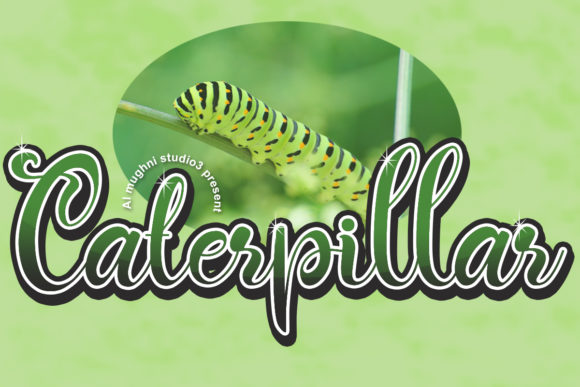
The font feels equally charming and elegant, making it perfect for high-impact areas where emotion matters more than data density. The strokes have a natural flow that mimics human handwriting without the messiness of a poor scan. On a desktop monitor, the curves render beautifully against a soft cream background, creating a sense of luxury. For a wedding planner or a lifestyle coach, using a script font like this in the hero banner immediately signals that the brand cares about detail and personal connection. It transforms a standard landing page into an experience.
Navigating Readability and Responsive Design
However, as any seasoned UI designer knows, beauty cannot come at the cost of usability. One of the biggest challenges with Script Amp category fonts is how they behave on mobile devices. I spent significant time checking the responsive breakpoints. On a large screen, the ligatures and swashes in Caterpillar Script are delightful. But on a 5-inch smartphone screen, those same details can become cluttered if not managed correctly.
My advice for integrating this premium font into your workflow is to be intentional with sizing. Caterpillar Script works best as a display font. I found that keeping the font size above 32px on mobile ensures the characters remain distinct and legible. If you are placing this text over an image banner, ensure there is sufficient contrast or use a subtle drop shadow. I also recommend disabling complex ligatures on smaller viewports via CSS media queries if the file supports it. While it is a beautiful handwritten font, it should not be used for navigation menus or small call-to-action buttons where scanning speed is essential.
Strategic Font Pairing for Digital Branding
The true power of Caterpillar Script shines when paired correctly. In my test project, I needed a body copy font that would let the script breathe without competing for attention. I paired it with a clean, geometric sans serif font for the paragraphs and sidebars. This combination creates a strong visual hierarchy. The script draws the eye to the headlines and key quotes, while the sans serif ensures the informational content remains accessible and easy to read.
This pairing strategy is vital for establishing a cohesive brand identity. If you pair two scripts together, the page often becomes chaotic. Instead, treat Caterpillar Script as the "voice" of the brand—warm, inviting, and personal—and let a neutral typeface handle the logistics. You could also try pairing it with a classic serif font if you want a more editorial, magazine-style look for a blog or a portfolio site. The contrast between the fluid curves of the script and the structured lines of a serif creates a sophisticated balance that elevates the perceived quality of the website.
Use Cases Beyond the Homepage
While the hero section is the most obvious application, I found several other creative ways to utilize this creative font throughout the user journey. It looks stunning on thank you pages after a purchase, adding a personal touch to the transaction. I also tested it on product cards for a digital shop selling printable wall art. Using Caterpillar Script for the product titles gave the items a handmade feel, even though they were digital downloads.
For social media graphics embedded within the site, such as Instagram feeds or promotional banners, this display font performs exceptionally well. Short phrases, quotes, and event dates pop beautifully. It is particularly effective for seasonal campaigns, like a Valentine's Day sale or a summer workshop announcement. However, avoid using it for long paragraphs of text. The varying stroke widths and connected letters make it difficult to read in dense blocks. Stick to short, impactful messages where the aesthetic value outweighs the need for rapid reading.
Licensing and Technical Considerations
Before you implement Caterpillar Script in a client project or your own online store, you must verify the licensing terms. As a web designer, I always check if the license covers webfont usage (WOFF/WOFF2) and if it allows for commercial projects. Many beautiful fonts are free for personal use but require a specific license for websites that generate revenue. Ensure you have the right to embed the font files directly into your site or to use a CDN service.
Additionally, check the included character sets. Does it support multilingual characters if your audience is global? Are there alternate glyphs or swashes that you can toggle to customize the look further? Having access to these design assets gives you more flexibility in logo design and header creation. Finally, consider the file weight. Large font files can slow down page load times, which negatively impacts SEO and user retention. Optimize the files you upload to ensure your site remains fast and responsive.
In conclusion, Caterpillar Script is a versatile tool for modern typography. It adds a layer of charm and elegance that generic system fonts simply cannot match. By using it strategically in headers, hero sections, and decorative elements, and by pairing it wisely with functional body fonts, you can create digital experiences that feel both professional and deeply personal. Whether you are building a portfolio, a coaching site, or an e-commerce store, this commercial font offers the perfect blend of style and usability for today's web landscape.