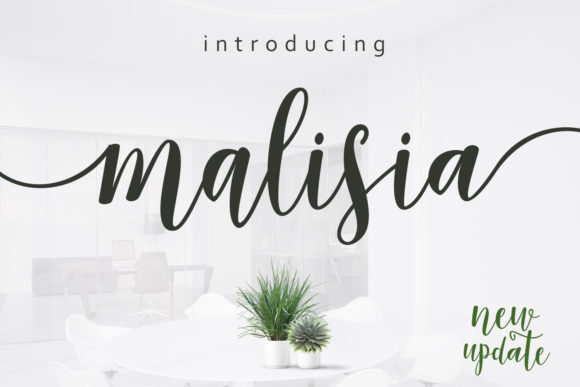
Malisia Script: A Modern Typeface for Digital Design
In the fast-paced world of web design and UI development, typography is not just about aesthetics; it is a functional tool that dictates user behavior. When we build landing pages, app interfaces, or online stores, every pixel counts. We need typefaces that communicate brand personality instantly while maintaining clarity across devices. This is where Malisia Script enters the conversation as a compelling choice for digital creators who want to blend trendiness with natural elegance.
As a designer, I often look for fonts that break the monotony of standard sans serif stacks without sacrificing performance. Malisia Script, part of the Script Amp collection, offers a modern and stylish approach to handwritten typography. It feels gentle yet confident, making it an ideal candidate for highlighting creative elements in wedding designs, party invitations, and business marketing materials. But its utility extends far beyond print. In the digital realm, this font can transform a sterile layout into a warm, inviting experience.
Enhancing Visual Hierarchy in Web Layouts
Visual hierarchy is the backbone of effective web design. Users scan pages rather than read them word-for-word. To guide their eyes, we use size, weight, and style contrasts. Malisia Script serves as an excellent display font for hero sections, section headings, and call-to-action areas. Its organic curves and fluid strokes create a natural focal point that draws attention immediately.
When used in a hero banner for a coaching website or a boutique online store, Malisia Script adds a human touch that static geometric fonts often lack. It suggests authenticity and care, which are crucial for building trust in brand-focused web experiences. However, because it is a script font, it must be used strategically. It works best for short phrases, logo text, or decorative accents rather than long paragraphs. By reserving Malisia for key headlines, you ensure that your most important messages stand out against the background noise of the internet.
Readability and Responsive Considerations
One of the biggest challenges with script fonts is readability on mobile screens. As a UI designer, I always test how a typeface renders at different breakpoints. Malisia Script performs well when given enough breathing room. On smaller devices, such as smartphones, it is essential to increase the font size and line height to prevent the ligatures from becoming cluttered.
For optimal digital readability, avoid using Malisia Script for body copy or small buttons. Instead, pair it with a clean sans serif font for navigation menus and content sections. This combination ensures that users can scan information quickly while still enjoying the aesthetic appeal of the headline. When placing text over image overlays, ensure there is sufficient contrast. A light background with dark text or vice versa helps maintain legibility. If you are using Malisia on a busy background, consider adding a subtle drop shadow or a semi-transparent overlay to separate the text from the image.
Strategic Font Pairing for Brand Identity
A strong brand identity relies on consistent typography. Malisia Script shines when paired with complementary typefaces. For a modern, minimalist look, pair it with a neutral sans serif font like Inter or Roboto. This contrast highlights the playful nature of the script while keeping the overall design professional and easy to navigate.
If you are aiming for a more editorial or luxurious feel, consider pairing Malisia with a classic serif font. This combination works exceptionally well for portfolio sites, course sales pages, and high-end product landing pages. The serif adds authority and tradition, while Malisia injects personality and warmth. Remember, the goal is balance. Too many decorative fonts can overwhelm the user, so let Malisia be the star of the show while supporting fonts handle the heavy lifting of information delivery.
Practical Applications in Digital Products
The versatility of Malisia Script makes it suitable for various digital projects. Here are a few practical ways to integrate it into your workflow:
- Landing Pages: Use Malisia for the main headline to create an emotional connection with visitors immediately.
- Online Stores: Apply it to category headers or promotional banners to highlight seasonal sales or new arrivals.
- Course Platforms: Use it for module titles or testimonial quotes to add a personal, mentor-like tone.
- Social Media Graphics: Create cohesive brand assets by using Malisia in Instagram stories, Pinterest pins, and Facebook ads.
- Email Newsletters: Incorporate it into header images or signature blocks to maintain brand consistency across communication channels.
By using Malisia Script consistently across these touchpoints, you reinforce your brand’s visual identity. Users begin to associate the gentle, natural style of the font with your brand’s values, whether that is creativity, compassion, or sophistication.
Technical Specs and Licensing for Web Use
Before implementing any premium font in a live project, it is crucial to check the technical specifications. Ensure that Malisia Script includes webfont formats such as WOFF and WOFF2, which are optimized for fast loading times on websites. Slow-loading fonts can negatively impact user experience and SEO rankings. Additionally, check for multilingual support if your target audience is global. Some script fonts have limited character sets, so verify that it supports the languages you need.
Licensing is another critical aspect. As a professional designer, you must respect commercial font licensing agreements. Using a font for a client’s website, an online store, or a digital template requires the appropriate license. Always review the terms provided by the font creator or distributor. Many premium fonts offer specific web licenses that cover page views or domain usage. Investing in the correct license protects you and your clients from legal issues and supports the creators who develop these valuable design assets.
In conclusion, Malisia Script is more than just a trendy typeface; it is a strategic tool for enhancing digital storytelling. By understanding its strengths in visual hierarchy, readability, and brand expression, you can create web experiences that are not only beautiful but also effective. Whether you are designing a simple blog header or a complex SaaS dashboard, choosing the right font can make all the difference in how users perceive and interact with your content.